


WiZ Connected
4.42.95K Reviews
App Specs
- Version
- 1.38.5
- Updated On
- License
- Free
- Downloads
- 1,000,000+
- Developer
- Signify Netherlands B.V.
- Categories
- House & Home
- Platform
- Android, iOS
Screenshots

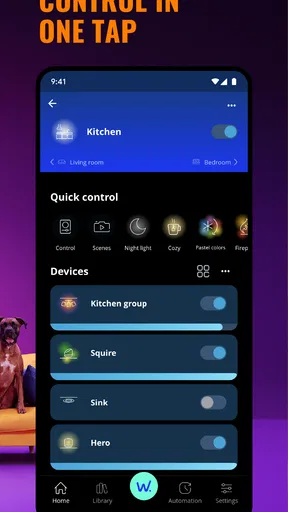
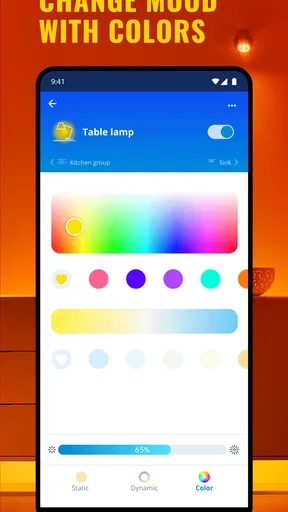
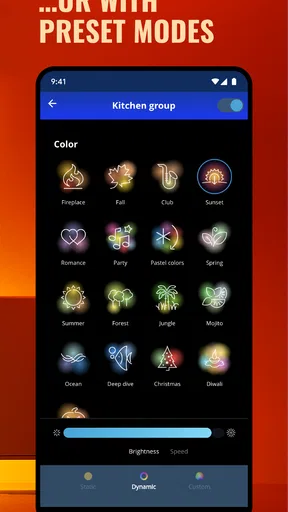
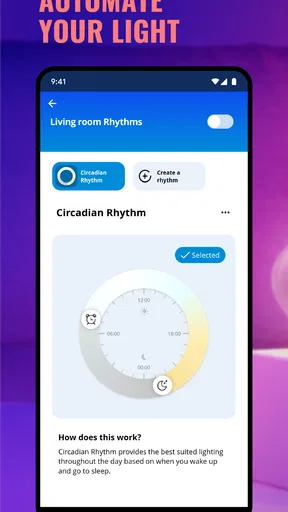
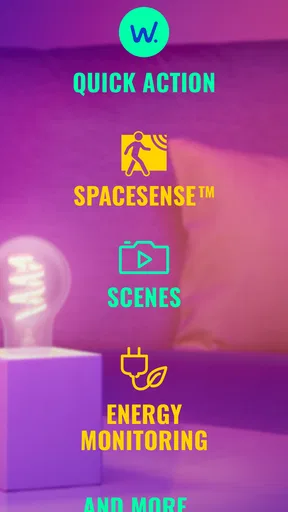
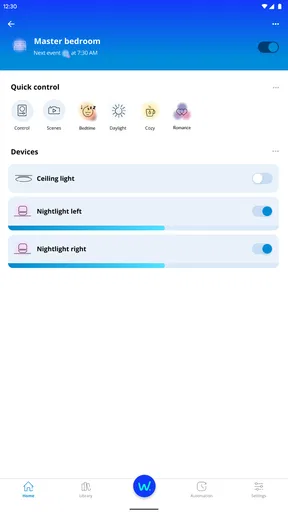
 Analysis by AppCompare
When I judge a smart-lighting app, I pay attention to more than how quickly a bulb changes color. The useful test is what happens when I’m away from home, switching between networks, or trying to recover from a connection problem. WiZ Connected is Signify Netherlands B.V.’s free House & Home app for controlling a WiZ lighting setup. Its appeal is straightforward: it puts everyday light adjustments and automation in one mobile place, while making a network connection an important part of the experience.
That network link is convenient when it works, but it also shapes what I would expect from the app. I’d set up the lights where I normally use them and check that control behaves reliably before building a complicated routine around it. If you’re deciding whether this is the right fit, consider how you use your Wi-Fi, how much you want to manage lighting from outside the house, and whether you prefer a dedicated lighting system or a broader smart-home setup.
Living with lighting that depends on a connection
I find that the most useful way to think about connected lighting is to separate setting it up from relying on it in a hurry. A scene can make a familiar room feel right with one choice, but the network is part of how that choice reaches the lights. Next, I’d look at where and when I actually use the phone, so convenience doesn’t turn into one more task.
Getting started and choosing a practical setup
Setting up WiZ Connected is as easy as pie. You download the app, connect it to your Wi-Fi, and voila, you're ready to roll! The interface is super intuitive, so even if you're not tech-savvy, you'll have no trouble navigating through it. It guides you step-by-step, ensuring you get your lights synced up in no time.
In practice, I’d take a little care over the first setup rather than rushing through it. Start with the room where you’ll notice a benefit every day, such as a bedroom or living room, and make sure you can control that light consistently before adding more. That gives you a simple way to distinguish an app setup issue from a problem with a particular bulb or the network. If several people in your home will use the lights, it’s also worth agreeing on sensible room names and scene names early; clear labels make voice commands and daily control less confusing.
The app is free to download, and it has an Everyone age rating. It has a 4.4 average from around 48,000 ratings, with more than a million installs, so it is already used by plenty of smart-lighting households. The current version is 1.30.4, and in-app purchases are listed at prices ranging from $0.99 to $3.99 per item. I’d treat those purchases as something to check in context rather than assume they are necessary to use the basic lighting controls.
Useful routines, scenes, and everyday decisions
The app is packed with features that make controlling your lights a breeze. From setting up schedules to changing the ambiance with different lighting modes, it’s all there. You know those lazy Sunday mornings when you just want to stay in bed? Well, now you can just use your voice assistant to dim the lights or turn them off completely. It's like magic!
Worth Reading Before You Choose

Flipboard Shows What News Apps Must Do Beyond the Feed

Switching to Android Auto Means Rethinking Your Driving Routine

Google Calendar Makes a Crowded Week Easier to Manage

Ludo King Makes the Most of the Minutes Between Plans

Baby Panda World Brings Quick Play to Modern Phones, but Its Game Library Feels Busy

ESPN’s Live Game View Makes Following Close Games Easier
One feature I absolutely love is the ability to create scenes. Imagine having a movie night scene where your lights automatically adjust to the perfect level. Or a party mode with vibrant colors that dance around the room. It’s all customizable, and you can get really creative with it.
The less obvious benefit of scenes is consistency: a single saved choice can be easier than adjusting several lights one by one whenever you want the same atmosphere. I’d keep the names descriptive and the number of scenes manageable. A few for real habits—quiet evening, reading, or settling in to watch something—are more useful than a long collection of near-duplicates that you have to scroll through or remember precisely.
A realistic routine might be to set a gentle bedroom scene before winding down, then use a schedule for a regular time when you want the room darker. The useful trade-off is that schedules reduce small daily tasks, but they need to match your actual habits. If your evenings change often, a manual scene may be less frustrating than a rigid schedule. I’d also review a routine when daylight hours or household habits shift, rather than assuming the same lighting pattern will stay convenient all year.
For shared spaces, think about the person who is not holding the phone. A simple scene that is easy to recognize can be more practical than a highly customized setup that only one person understands. This is where connected lighting works best: it makes a repeated action easier without making everyone learn a new system. If you mostly want a physical switch and rarely adjust color or timing, though, the app’s extra controls may not add enough value to justify changing your habits.
Network-dependent moments and mobile use
The performance is top-notch. I’ve had no issues with lag or disconnection, which is a big win in my book. The app connects seamlessly to your smart bulbs and responds instantly to commands. Whether you’re using Wi-Fi or mobile data, the app ensures a smooth experience.
Connectivity deserves a realistic caveat: the experience of controlling smart lights can depend on the phone’s connection, the home network, and the device you’re trying to reach. I would not plan around an assumption that every control will behave identically from every location. At home, a dependable Wi-Fi setup is the sensible foundation. Away from home, mobile data can be useful for checking or changing lights, but I’d test the specific actions I care about before relying on them—for example, turning a light off after leaving or adjusting a room before getting back.
One practical tip is to avoid making a critical household routine depend on a last-minute remote tap. If you’re leaving for a trip, check the lights and schedules while you’re still at home and have time to correct anything. That is not because every remote command will fail; it is simply a calmer way to handle a task where a network hiccup could otherwise leave you guessing. When a command seems delayed, I’d first check whether the phone is online and whether the home Wi-Fi is behaving normally, then try again before changing the setup.
Mobile use also changes what feels convenient. From the sofa, opening an app to select a scene can be pleasant; while carrying groceries or getting ready to leave, a schedule or voice command may be more natural. I’d use the app to create and refine the lighting choices, then rely on whichever control method fits the moment. That keeps the phone from becoming a mandatory remote for every small adjustment.
The app is available on Android and iOS, which helps if people in the same household use different phone platforms. Still, platform availability is not the same as a guarantee that every connected-home arrangement will behave the same way. If you already use voice control or other smart-home tools, check the setup you intend to use and try a basic command before building an elaborate routine around it.
Recovering from trouble and keeping control manageable
When a light does not respond, I would resist immediately deleting a room or starting the setup again. First, check the simple things: whether the phone has a working connection, whether the Wi-Fi is available, and whether the issue affects one light or several. If the problem is limited to one device, that points to a different troubleshooting path than a whole-home interruption. Keeping the first test simple—one light and one direct command—makes it easier to see whether the problem has cleared.
For a household with several rooms, I’d add lights in small groups and test each group before moving on. It takes a little longer initially, but it makes later troubleshooting far less mysterious. Similarly, when changing a network setup, test control again before assuming that saved scenes or schedules are the cause of a problem. Separating these steps is a small bit of discipline that can prevent needless reconfiguration.
There is a broader trade-off here: app-based control is flexible, but it asks you to maintain a connected setup. People who want lighting to be entirely independent of their phone and home network may prefer a simpler manual approach or a system whose local control behavior they have specifically verified. I wouldn’t choose this app on the promise of network-independent operation; I’d choose it for the convenience of app-managed lighting and make sure the connectivity arrangement suits my home.
Privacy-minded use and choosing an alternative
For a data-conscious household, my advice is to keep the setup purposeful. Add only the rooms and routines you intend to use, and review the app’s current privacy and device settings directly before deciding what information or access you are comfortable with. I wouldn’t infer a particular data practice just from the fact that an app controls lights. A restrained setup is easier to understand, easier to maintain, and less likely to leave you with forgotten routines that no longer match your day.
Compared with ordinary bulbs and wall switches, WiZ’s app-based approach is more adaptable: scenes, schedules, and phone control can suit changing moods and routines. Compared with a broad smart-home platform, a lighting-focused app may feel more direct when the job is simply to manage lights, but it may not be the best central control point if your priority is coordinating many kinds of devices. The right choice depends on whether you want lighting convenience on its own or one interface for a wider home system.
I’d recommend trying WiZ Connected if you have compatible WiZ lights, use scenes or schedules, and are comfortable depending on a stable network for app control. I’d be more cautious if you rarely change your lighting, dislike managing connected devices, or need a control method that you know will work independently of network access. The app’s 2,500 reviews reflect a substantial user base, but the best test for your home is still a small, practical setup before you commit to building every room around it.
Performance and connectivity
The performance is top-notch. I’ve had no issues with lag or disconnection, which is a big win in my book. The app connects seamlessly to your smart bulbs and responds instantly to commands. Whether you’re using Wi-Fi or mobile data, the app ensures a smooth experience.
And let's talk about the app’s compatibility. It works with a wide range of smart home systems, so chances are, it’ll fit right into your existing setup. Plus, it’s available on both Android and iOS, which is always a plus when you’re switching devices.
Ending Thoughts
Overall, WiZ Connected has been a game-changer for my home. It’s simple, reliable, and packed with features that make life a little easier. Whether you're looking to up your home automation game or just want more control over your lighting, this app is definitely worth checking out.
So, if you're ready to bring your lighting into the 21st century, give WiZ Connected a try. Trust me, once you do, there’s no going back!
Pros
- User-friendly interface for easy navigation.
- Wide range of lighting options available.
- Seamless integration with smart home devices.
- Energy-saving features to reduce costs.
- Customizable schedules and routines.
Cons
- Requires stable internet for optimal performance.
- Limited offline functionality.
- Initial setup can be time-consuming.
- Some features require in-app purchases.
- Occasional connectivity issues with devices.
FAQs for WiZ Connected
What is WiZ Connected, and how does it work?
WiZ Connected is a smart lighting app that allows you to control WiZ smart bulbs and lights from your smartphone. Using Wi-Fi, the app lets you manage lighting settings, create schedules, and customize scenes to enhance your living space. It’s compatible with both Android and iOS devices, making it easy to integrate into your smart home setup.
Is WiZ Connected compatible with other smart home systems?
Yes, WiZ Connected is designed to work seamlessly with various smart home systems. It supports integration with popular platforms like Amazon Alexa, Google Assistant, and IFTTT, allowing you to control your lighting using voice commands or automate your lights with other smart devices in your home network.
How user-friendly is the WiZ Connected app for beginners?
The WiZ Connected app is very user-friendly, featuring an intuitive interface that guides users through the setup process. With its straightforward design, even beginners can easily navigate through the app to adjust brightness, change colors, and set schedules without needing extensive technical knowledge or experience.
Does WiZ Connected require any additional hardware to function?
To use WiZ Connected, you will need compatible WiZ smart bulbs or lighting products. However, there is no need for a separate hub or bridge, as the app connects directly to your Wi-Fi network. This simplifies the setup process, allowing you to control your lights without extra equipment.
Are there any privacy concerns when using WiZ Connected?
WiZ Connected takes privacy seriously and employs secure connections to protect user data. The app requires access to your Wi-Fi and may request permissions for certain features like location for automation. Users are advised to review the app’s privacy policy and understand the permissions it requires to ensure they are comfortable with the data usage.


